Notification service architecture.
The architecture is straightforward. The reason this needs to be one service is that the rules about when not to send are the hard part, and they have to live somewhere every sender passes through.
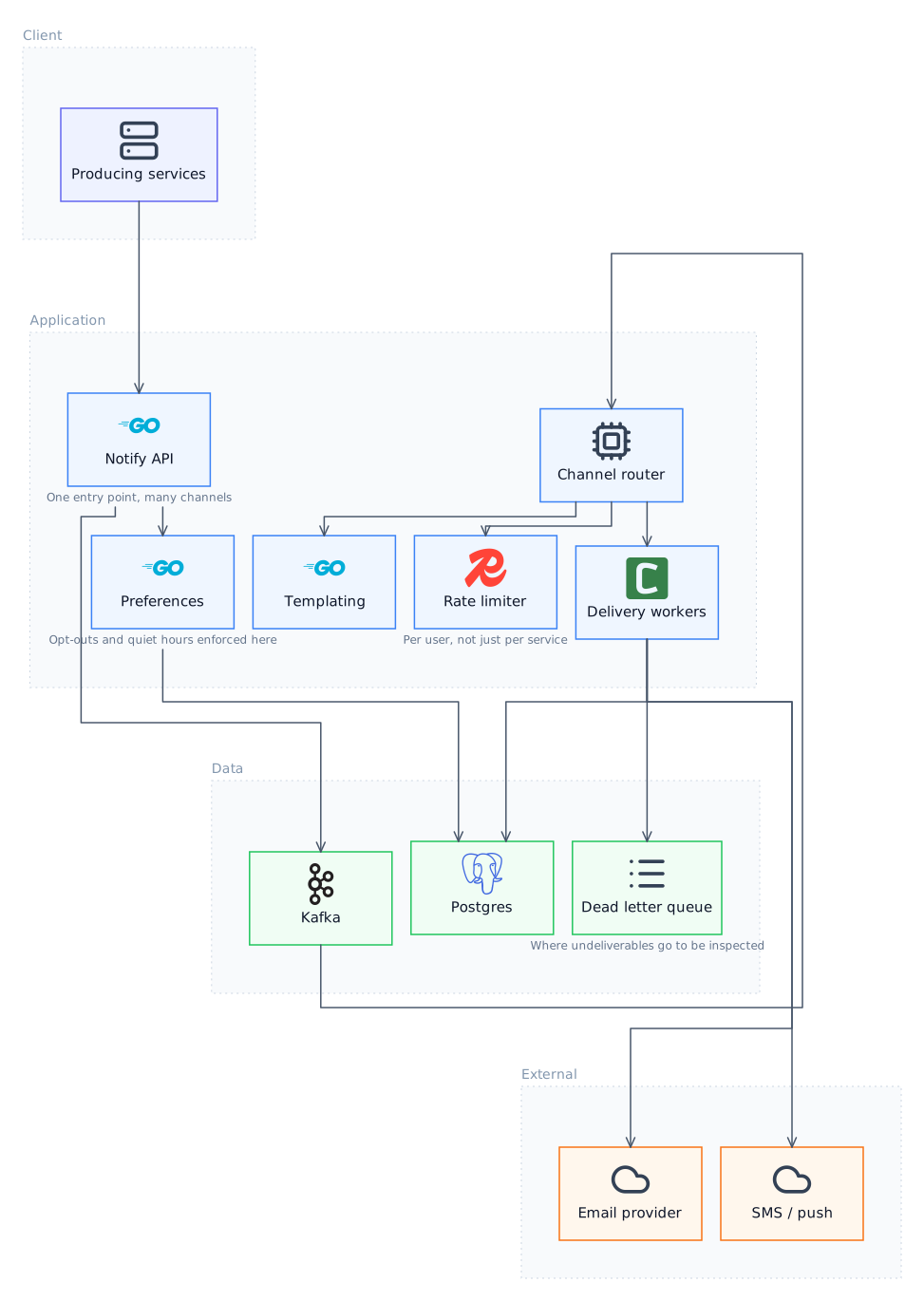
The components
Every row below is read from the graph that produced the diagram above, so the two cannot disagree.
| Component | Tier | Why it is there |
|---|---|---|
| Producing services | Client | Supporting component |
| Notify API | Application | One entry point, many channels |
| Preferences | Application | Opt-outs and quiet hours enforced here |
| Templating | Application | Supporting component |
| Channel router | Application | Supporting component |
| Rate limiter | Application | Per user, not just per service |
| Delivery workers | Application | Supporting component |
| Kafka | Data | Supporting component |
| Dead letter queue | Data | Where undeliverables go to be inspected |
| Postgres | Data | Supporting component |
| Email provider | External | Supporting component |
| SMS / push | External | Supporting component |
Design decisions worth arguing about
A diagram shows what was chosen. It does not show what it cost, and that is usually the part that matters in a review or an interview.
One entry point, or the rules do not hold
If services can send email directly, then opt-outs, quiet hours and frequency caps are enforced only by whichever teams remembered them. Funnelling everything through one API is what makes those guarantees real rather than aspirational. The cost is a service on the critical path of many features and a migration to get everyone off their existing send calls, which is usually the harder half.
Rate limit per recipient, not per sender
Limits usually get applied per calling service, which does nothing for the user receiving twelve notifications from six services during one incident. Limiting per recipient across all channels is what actually protects the human. It requires shared state on the send path and a policy for what to do when the limit is hit, and dropping is almost always worse than collapsing several notifications into a digest.
Asynchronous, so a provider outage is not your outage
Calling the email provider synchronously ties the caller's latency and availability to a third party. Queueing means a provider outage becomes a delivery delay instead of a user-visible failure, and the queue absorbs bursts that would otherwise hit provider rate limits. The price is that senders no longer learn whether delivery succeeded, so status has to be exposed some other way.
A dead letter queue you actually read
Undeliverable notifications have to go somewhere, and the usual failure is that they go to a queue nobody has looked at in months. The design decision is not whether to have a DLQ but who is alerted when it grows and what tooling exists to replay from it, because a DLQ without a replay path is a deletion with extra steps.
How it changes with scale
Volume is bursty and correlated: everything wants to notify everyone at the same moments. Sizing for peak is wasteful and sizing for average means backlog during exactly the events that matter, so this is a queue-depth problem rather than a throughput one. Provider rate limits usually bind before your own capacity does.
Where it breaks first
A retry storm against a degraded provider. The provider slows down, workers time out and retry, the retries add load, and the provider degrades further. Without a circuit breaker and backoff the system converts a partial outage into a total one, and the queue grows past the point where catching up is possible within the notifications' useful lifetime.
Draw this yourself
Open the Diagram tab and describe the system. The agent emits a semantic graph rather than coordinates, so you can edit the components and the layout re-solves instead of drifting.
When the shape is right, Implement in code turns the canvas into a markdown specification, every component, every relationship and the notes, and starts a real turn in the Code tab with it.
Questions about this design
Should templates live in this service or in the calling service?
Here. Templates in callers means every team reimplements localisation, branding and unsubscribe links, and the day the footer has to change legally you have to find all of them.
How do you prevent duplicate notifications?
An idempotency key derived from the triggering event, checked before enqueueing. At-least-once delivery is the default in every queue, so without this a consumer retry becomes a second email.
What belongs in the payload versus looked up at send time?
Enough context to render without a lookup, because the notification may be sent minutes later when the source data has changed. Rendering against current state produces notifications describing a world that no longer matches the event that triggered them.
How do you test this without sending real messages?
A sink channel that records rather than delivers, selected per environment. The important part is that it sits at the channel router rather than in each worker, so nothing can bypass it.
More templates
- Distributed Rate Limiter DesignEvery design here is a trade between how accurate the limit is and how much latency you are willing to add to every single request to achieve it.
- Observability Stack ArchitectureThe architecture is mostly about cost control. Collecting everything is technically easy and financially ruinous, so the interesting decisions are all about what to throw away.
- Authentication Service DesignStateless tokens make verification free and revocation hard, and that single tradeoff explains most of the components in this diagram.
- Event-Driven Microservices DesignDistributed transactions do not exist here, so every consistency guarantee you want has to be rebuilt out of events, retries and compensation.
Last updated