An alternative to the draw.io MCP server.
The difference is who decides where the boxes go.
draw.io MCP servers expose drawing primitives, so the language model chooses shapes and coordinates, which is what produces overlapping boxes and crossing arrows on anything beyond a few nodes. Lucid Train's MCP server takes a semantic graph of components, tiers and edges with no coordinates at all and runs the ELK constraint solver over it. The model decides structure and never decides position.
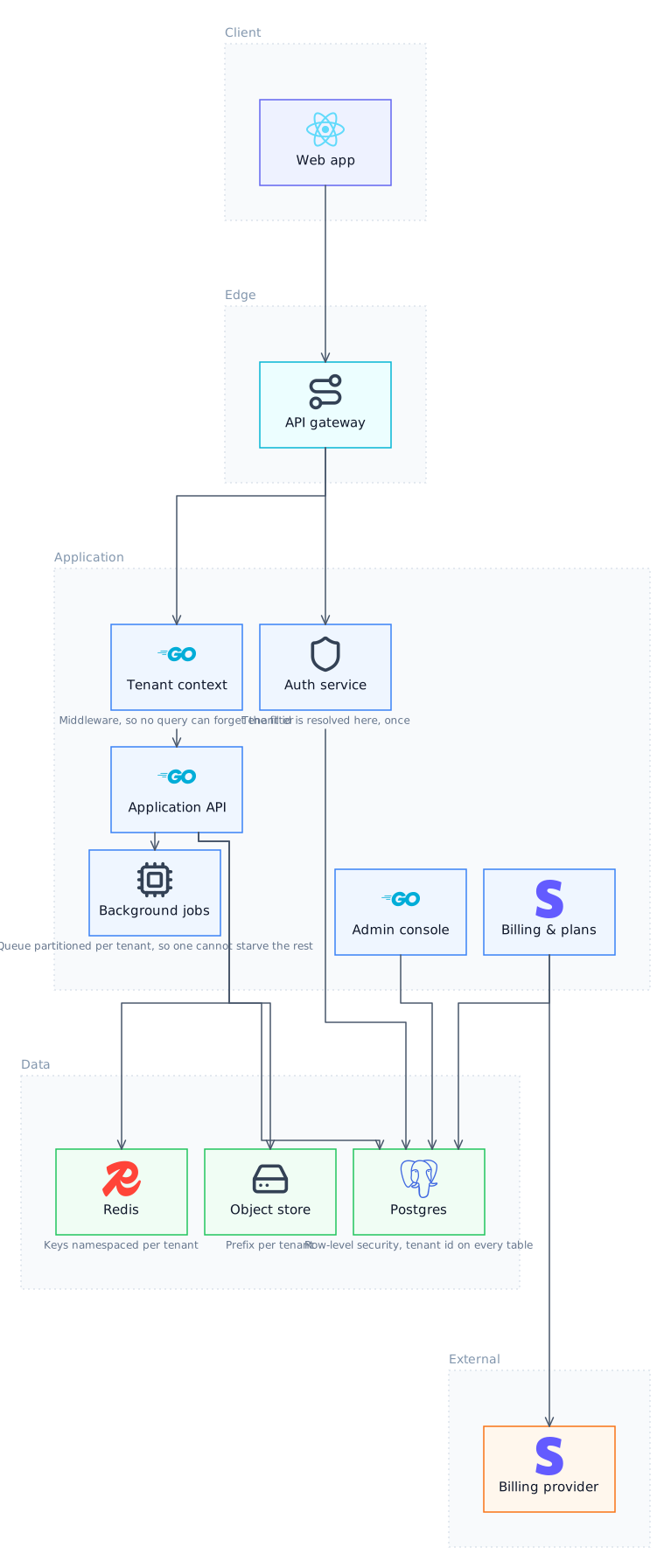
Where primitive-level MCP servers struggle
Giving a model a create-shape and a create-connector tool works for four boxes and degrades quickly. Language models are poor at spatial arrangement: they place things that overlap, route edges through cards, and produce diagrams that need manual tidying, which defeats the purpose of generating them. No amount of prompting fixes it, because the request is asking the model to do the thing it is worst at.
The semantic graph approach
Lucid Train's emit_diagram takes nodes, edges and tiers with no coordinates. ELK, a layered constraint solver, computes positions and orthogonal routing. Overlaps are not unlikely, they are impossible, because nothing in the pipeline can express one. That also makes editing cheap: change a component and the whole layout re-solves rather than drifting.
What you give up
Free-form drawing. draw.io covers floor plans, org charts, BPMN and network topology with an enormous shape library, and Lucid Train does none of that. This is a software architecture tool, so if you need a diagram type outside that, the draw.io route is the right one.
Transport
Connections are stdio: the server runs as a local child process with piped stdin and stdout. Remote HTTP and SSE servers appear in the Connectors tab's registry search but cannot be connected, and that is a real limit rather than a configuration step you are missing. A remote server needs a local stdio bridge in front of it.
Output formats
SVG that renders natively in a GitHub README, 2x PNG, a Markdown Architecture section written into the repo, and the underlying Excalidraw scene, which opens in any Excalidraw client. There is no draw.io XML export, so this is not a drop-in for a team standardised on draw.io files.
Two approaches to a diagram MCP server
| Lucid Train | Primitive-level servers | |
|---|---|---|
| Who chooses positions | An ELK constraint solver | The language model |
| Overlapping boxes | Structurally impossible | Common past a few nodes |
| Edge routing | Orthogonal, computed | Model-chosen |
| Tier bands | Yes | No |
| Real service icons | Yes, bundled, offline | Shape libraries |
| Editing | Re-solves the layout | Manual repositioning |
| Diagram types | Software architecture | Anything |
| Transport | stdio | Varies |
Questions
Why do MCP-generated diagrams often look wrong?
Because most diagram MCP servers ask the model for coordinates, and spatial arrangement is the thing language models are least reliable at. A server that takes a semantic graph and runs a layout solver removes the failure entirely.
Can Lucid Train open .drawio files?
No. It works with Excalidraw scenes. Exported SVG and PNG go anywhere, but there is no round trip into draw.io's XML.
Does it work with the same MCP clients?
Any client that supports stdio servers, which includes Claude Code, Codex and Cursor.
Related
- Excalidraw MCP Server AlternativeSame format, no lock-in, and a solver does the arranging.
- MCP ConnectorsRegistry search or a command and some environment variables. Anything that speaks stdio.
- Architecture Diagram MCP ServerPoint your existing agent at it and get diagrams that a solver laid out rather than a language model.
- Architecture Diagrams in Claude CodeKeep working in Claude Code and get a diagram that a layout solver produced.
Last updated